[Editor’s note] A start-up is a company that “starts” in order to solve a specific problem. Because its survival is at stake, a start-up strives to find the most efficient answer to that problem. The results of these struggles have often become the “innovation” that people enjoy today.
However, most start-ups, despite having strong technologies and services, are not growing sufficiently. Multiple factors are at play, but the biggest issue is that even with good technology, they fail to communicate it effectively to society. Through [Startup Review], this series aims to present start-ups’ technologies, explore how they can be used, and share perspectives from industry stakeholders.
As generative artificial intelligence (AI) becomes more widespread, there are growing instances of its use in résumé writing. By leveraging generative AI, applicants can easily create high-quality résumés that fully highlight their strengths and job capabilities.
Recruiters, however, are finding document screening increasingly difficult. As more high-quality résumés are submitted, it is becoming harder to assess applicants’ actual capabilities based solely on the documents. There are also cases of abuse in which generative AI is used to craft plausible but inaccurate content, further adding to recruiters’ difficulties.
As the discriminating power of document screening weakens, the importance of interviews is increasing. Recruiters must constantly consider how to hire talent well-suited to their organization using objective and fair criteria. But most recruiters find it difficult to respond to these changes, because coordinating interview schedules between interviewers and applicants requires considerable time and resources.
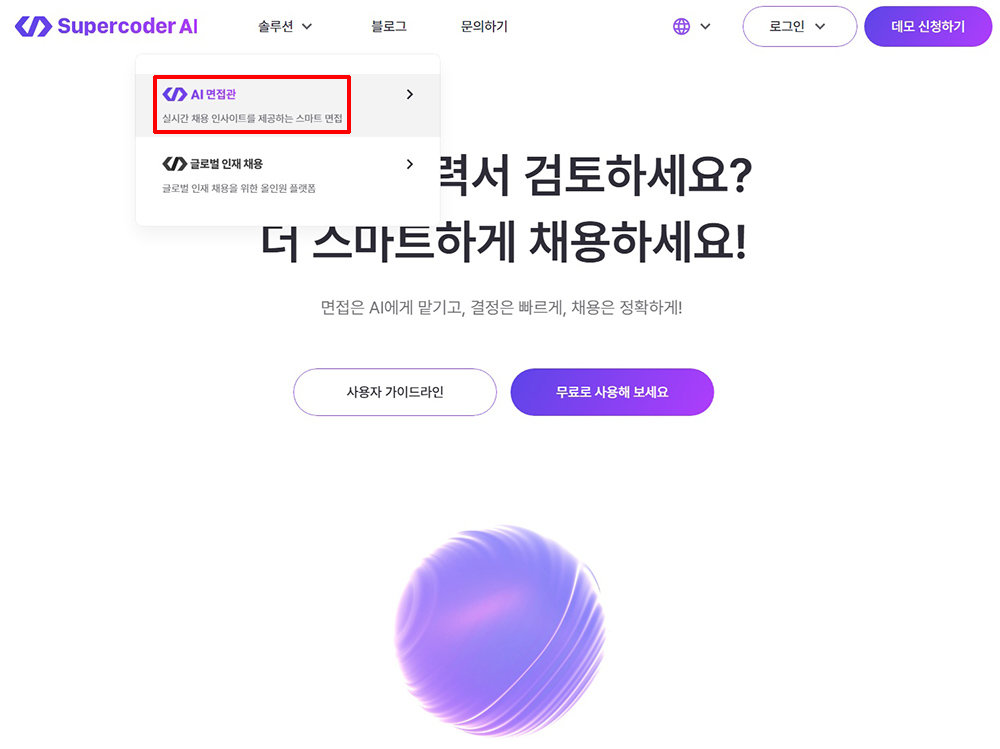
Second Team Supercoder AI Interviewer / Source=Second Team
Second Team, which operates the global recruitment platform “Supercoder,” has launched an AI-based interview solution, “Supercoder AI Interviewer” (hereinafter AI Interviewer). Second Team explains that AI Interviewer reduces recruiters’ workload and supports efficient hiring. This article examines the advantages of AI Interviewer from the perspectives of both recruiters and applicants based on direct use of the service.
AI Interviewer that improves recruitment efficiencySecond Team operates Supercoder, a global recruitment platform that screens global talent through its own verification system and helps companies more easily find global talent suited to their organizations. Over the past four years of operating Supercoder, Second Team has directly managed more than 20,000 interviews and hiring processes to verify talent. Through this, the company has experienced firsthand the inefficiencies faced by recruiters and the difficulties of talent verification, and developed AI Interviewer to address these issues.
AI Interviewer is a service that automates the interview process using AI. It analyzes job postings and applicants’ résumés to generate optimal questions, and creates additional real-time follow-up questions tailored to applicants’ responses. After the interview, it analyzes the content of the responses, assesses applicants’ strengths and job suitability, and provides a report.
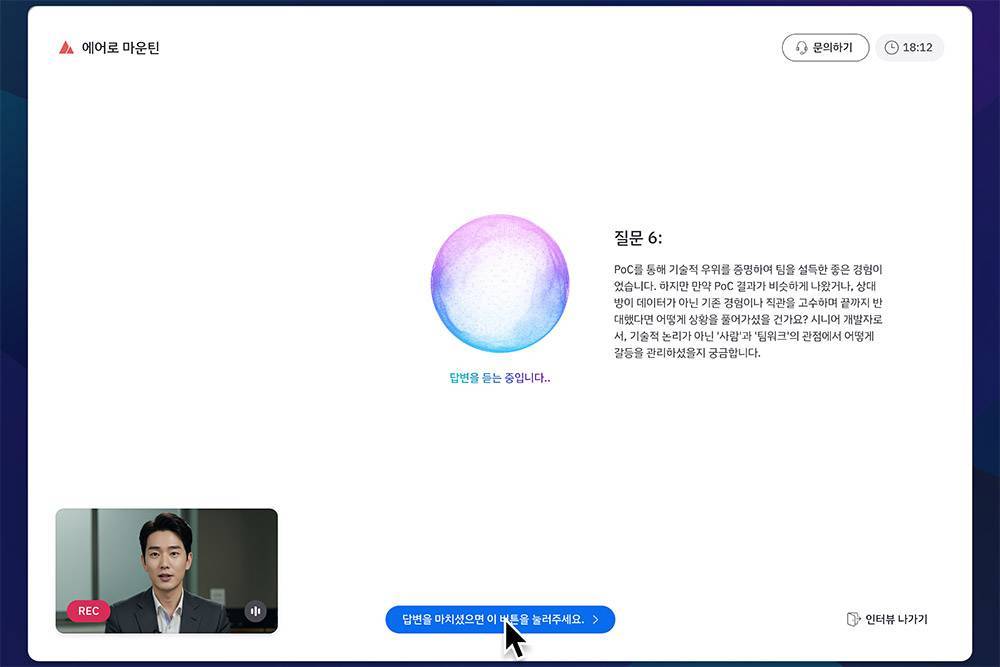
Example screen of an interview using AI Interviewer / Source=Second Team
AI Interviewer resolves challenges companies face in the hiring process. It significantly reduces the time spent coordinating interview schedules between interviewers and applicants and reviewing applicants’ documents and interview content, while enabling effective assessment of applicants’ actual capabilities through data-driven in-depth interviews. Another advantage is its fair and objective evaluation without the subjectivity or bias of human interviewers. Applicants can also participate in interviews without restrictions of time or location.
Currently, more than 80 companies, including IT and financial conglomerates, are using AI Interviewer. These companies cite reduced time and cost devoted to hiring and improved ability to distinguish desired talent as key benefits.
Automatic generation of evaluation criteria and interview questions, easy to use
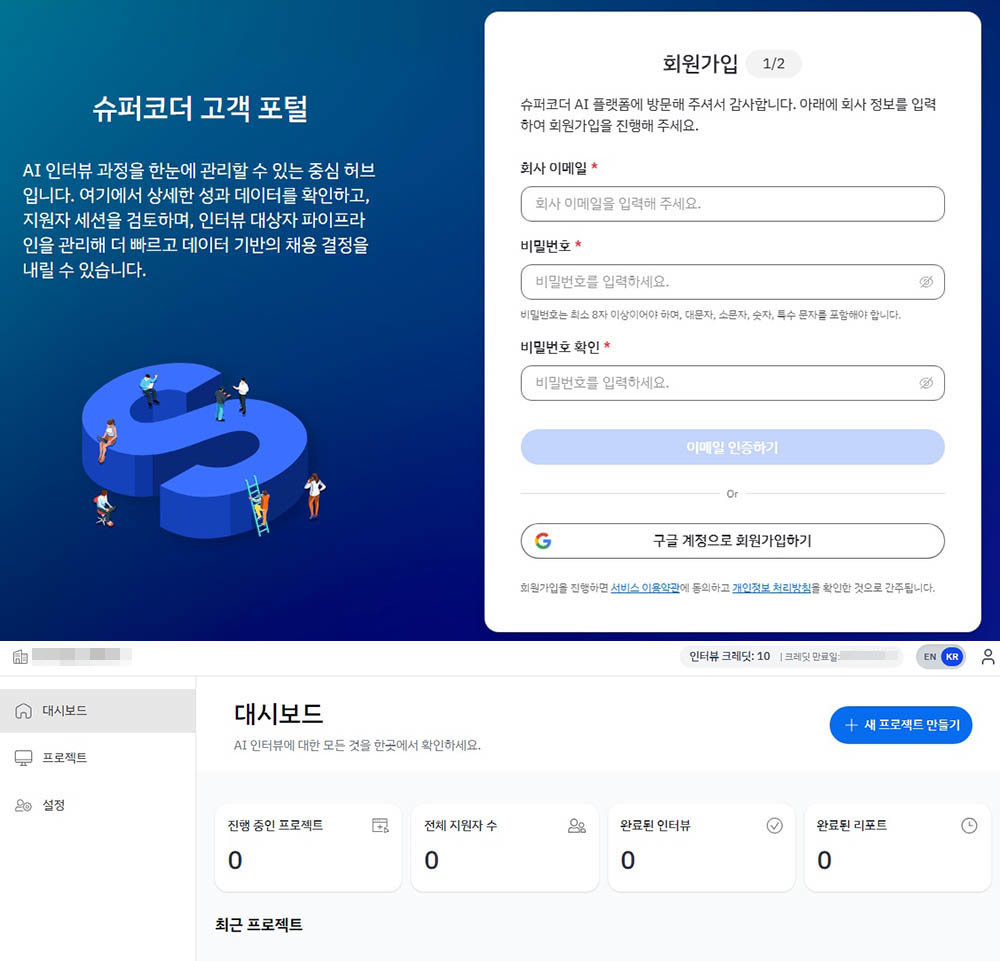
After signing up and logging in to the Supercoder website (top), the dashboard appears / Source=IT DongA
To use AI Interviewer, first visit the Supercoder website and click the “Login” menu at the top right to sign up and log in. Users can sign up with their corporate email or Google account and must complete account verification via an email sent to the registered address. After verification and login, the dashboard appears.
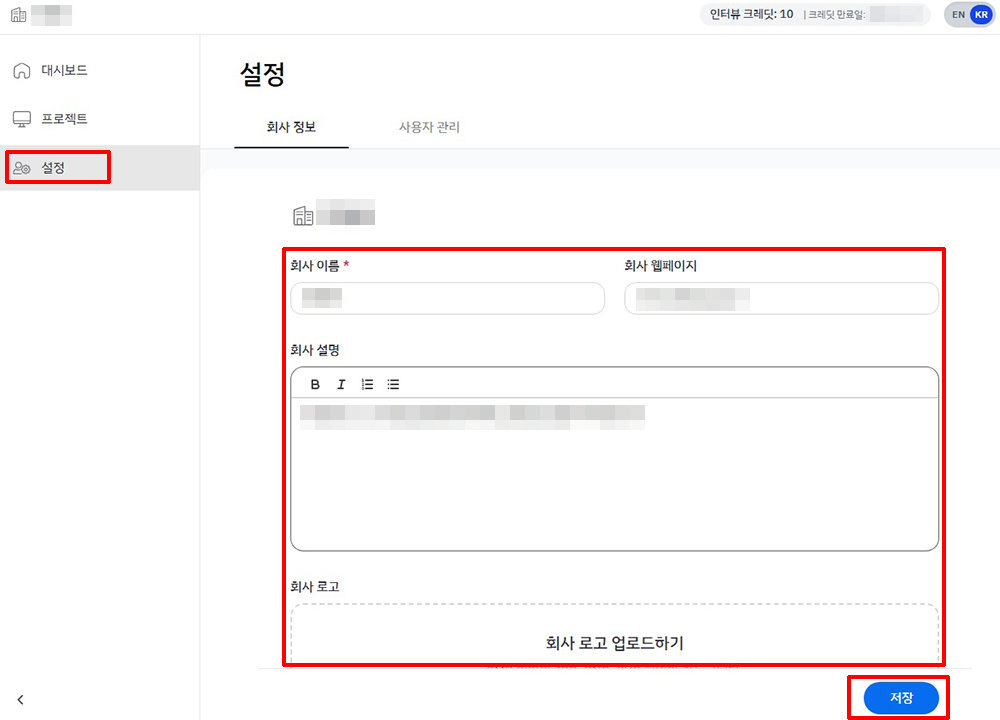
Enter company information in Settings / Source=IT DongA
First, enter the company information. Go to “Settings” in the left-hand menu and input the company name, website, company description, logo, and so on, then click “Save” at the bottom right.
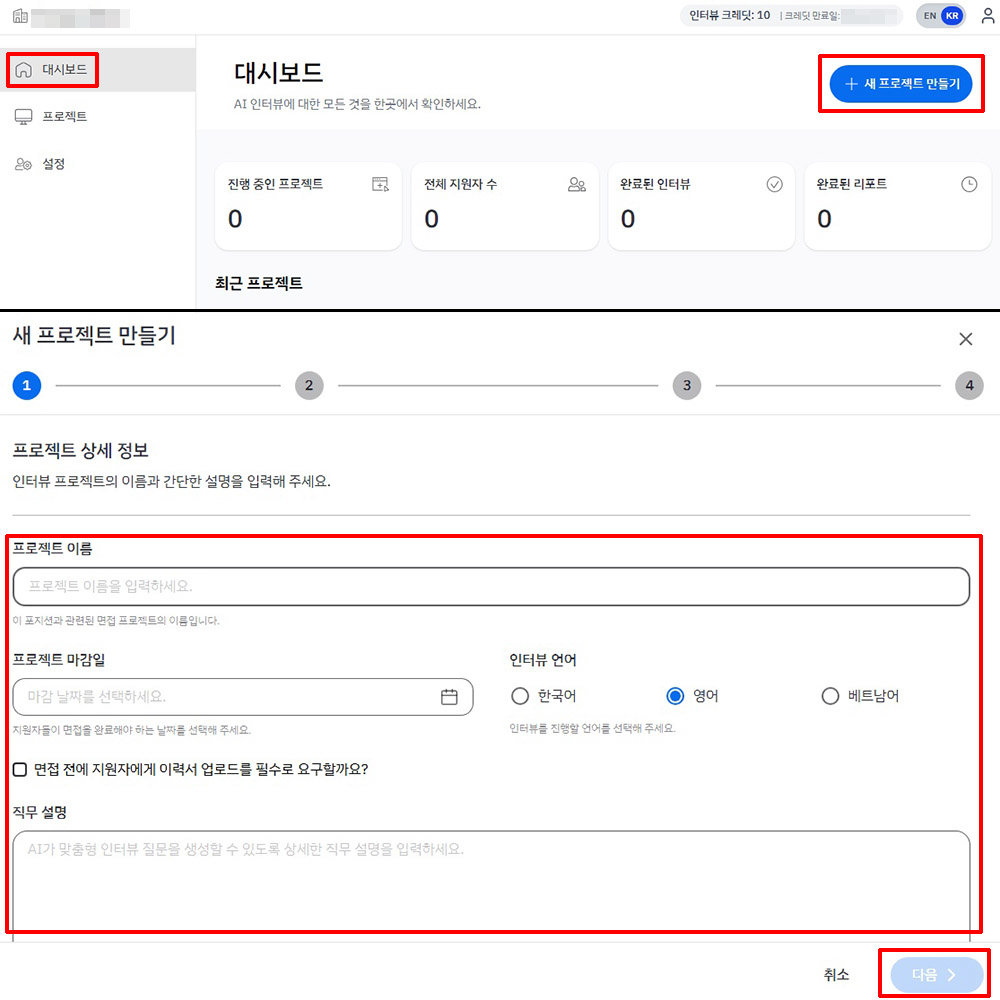
Select “Create New Project” and enter project details / Source=IT DongA
Next, create a project to conduct recruitment interviews. On the dashboard, click “Create New Project” at the top right. Project creation proceeds in four steps. The first step is entering project details.
Information to enter includes project name, project deadline, language, whether to collect résumés, and job description. The project deadline is the date by which applicants must complete their interviews, and the job description is where the job posting or description of the desired candidate’s competencies is entered. For the job description, it is advisable to write in sufficient detail so that AI Interviewer can generate appropriate evaluation criteria and questions. Currently, interview languages supported are Korean, English, and Vietnamese.
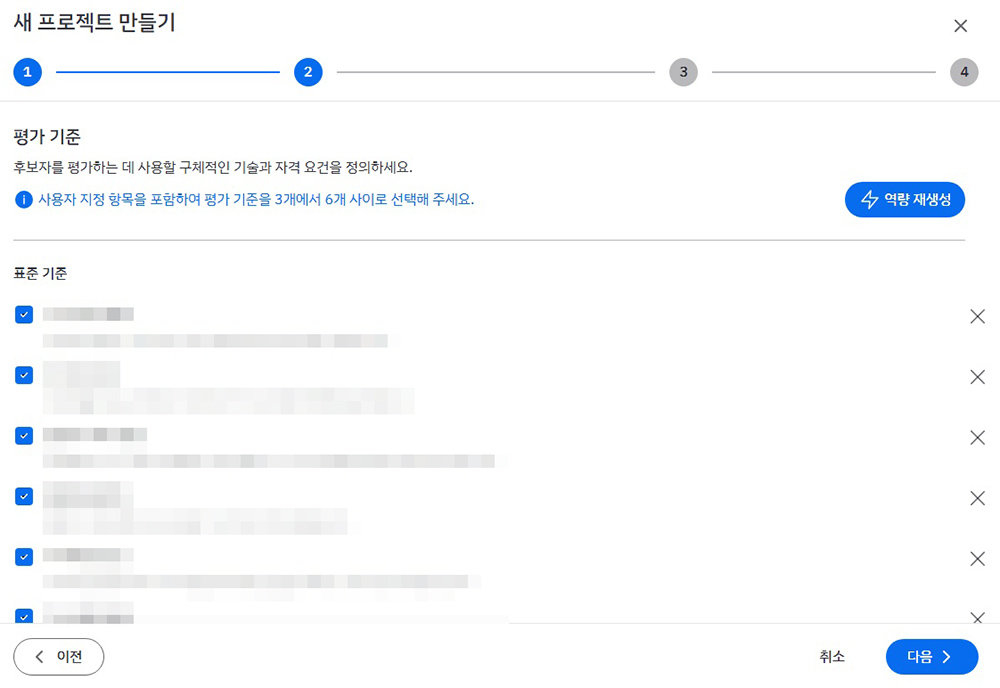
Set the evaluation criteria / Source=IT DongA
The second step is setting the evaluation criteria. Based on the project details, AI Interviewer automatically generates these criteria. Up to six criteria can be set, and they can be edited, added, or deleted. To completely revise all criteria, select “Regenerate Competencies” at the top left.
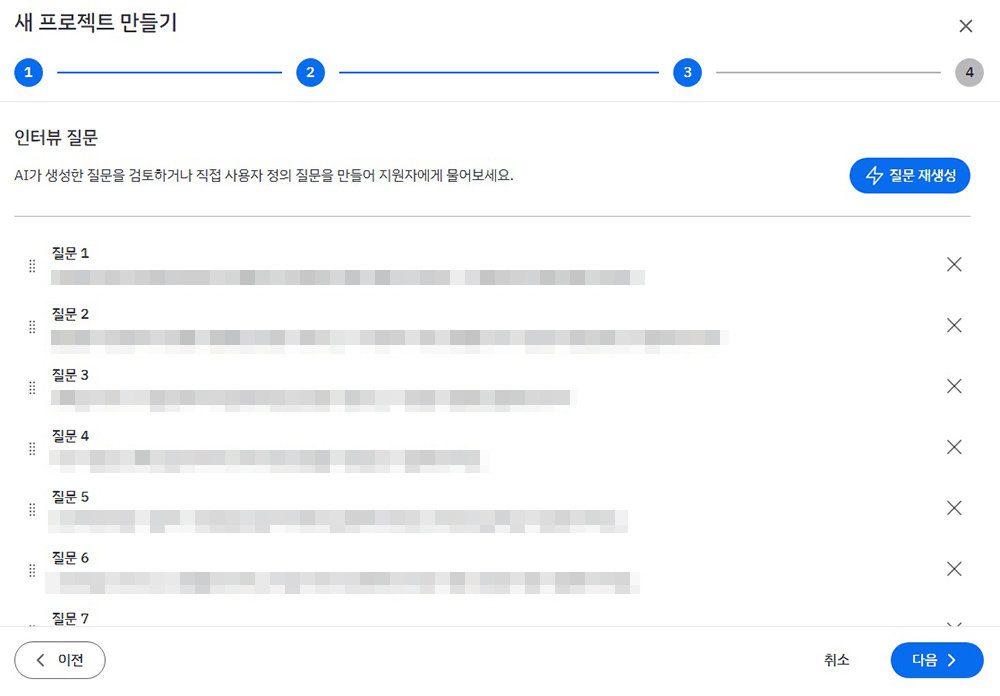
Set the interview questions / Source=IT DongA
The next step is generating interview questions. These are also automatically created by AI Interviewer. Based on the job description and evaluation criteria entered earlier, it proposes tailored questions. Initially, a total of eight questions are generated: four behavior-based evaluation items and four competency evaluation items. The list of questions can of course be edited, added to, or deleted. There is no limit to the number of questions. However, Second Team notes that 4–6 questions is appropriate, taking into account the in-depth follow-up questions AI Interviewer generates in real time.
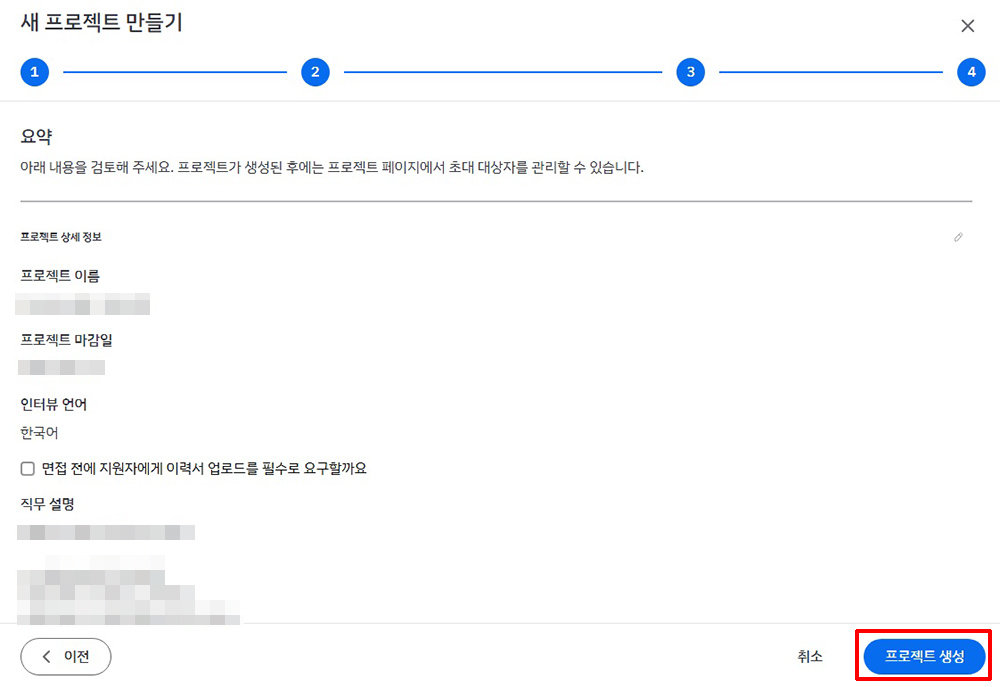
Review the project details and click “Create Project” / Source=IT DongA
Now review the information entered in the previous steps. After checking all items, if revisions are needed, click “Previous” at the bottom left to edit. If everything is correct, click “Create Project” at the bottom right and then select “Confirm” in the separate pop-up window. The created project can be checked in the dashboard and in the Projects menu.
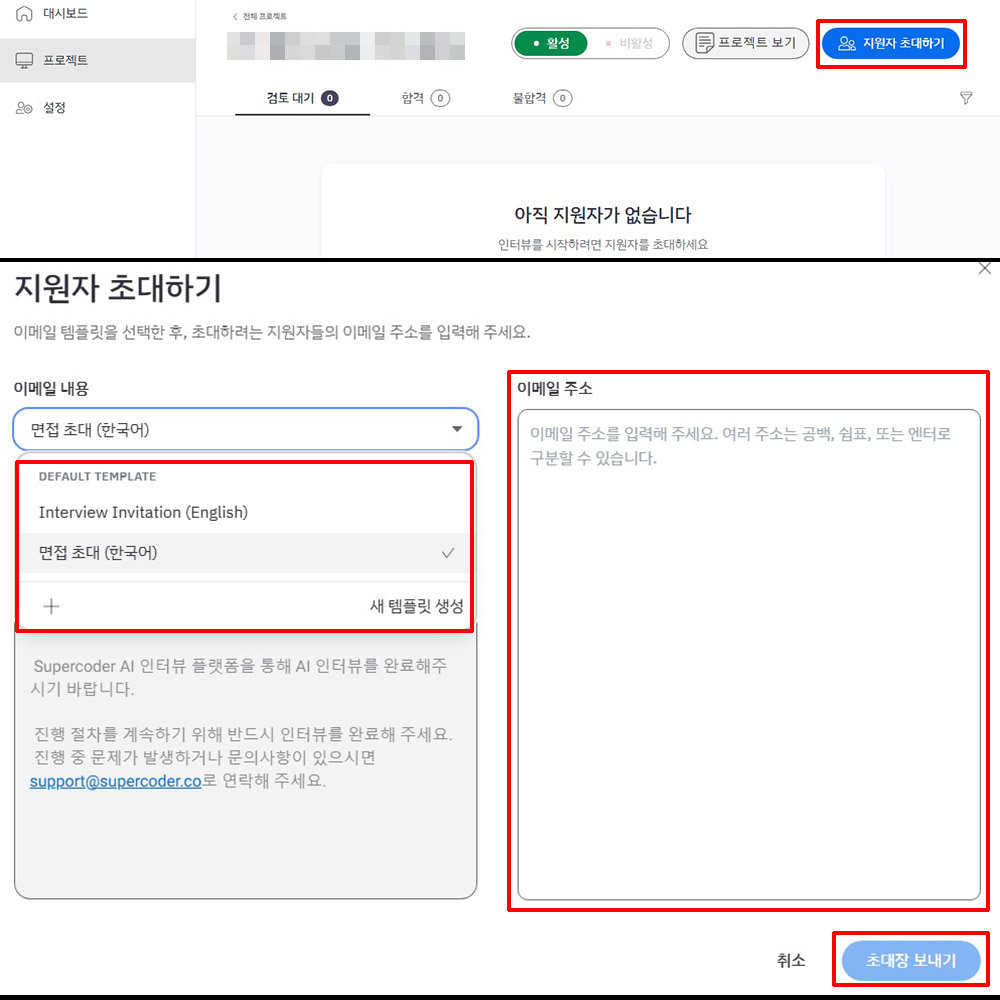
Click “Invite Candidates,” enter the email content and addresses, then click “Send Invitations” / Source=IT DongA
After creating a project, invite candidates. Go to “Projects” in the left-hand menu, select the project, and click “Invite Candidates” at the top right. When the pop-up window appears, enter the email content and addresses.
For the email content, users can either use the template provided by AI Interviewer or create their own. For email addresses, enter the email addresses of candidates who will be interviewed. There is no limit to the number of addresses that can be entered, and multiple addresses can be separated by spaces, commas, or line breaks.
After entering the information, click “Send Invitations” at the bottom right to send invitations to candidates. The invitation list can be checked in the Projects menu. Users can see at a glance the invitation send date, interview participation status, and results.
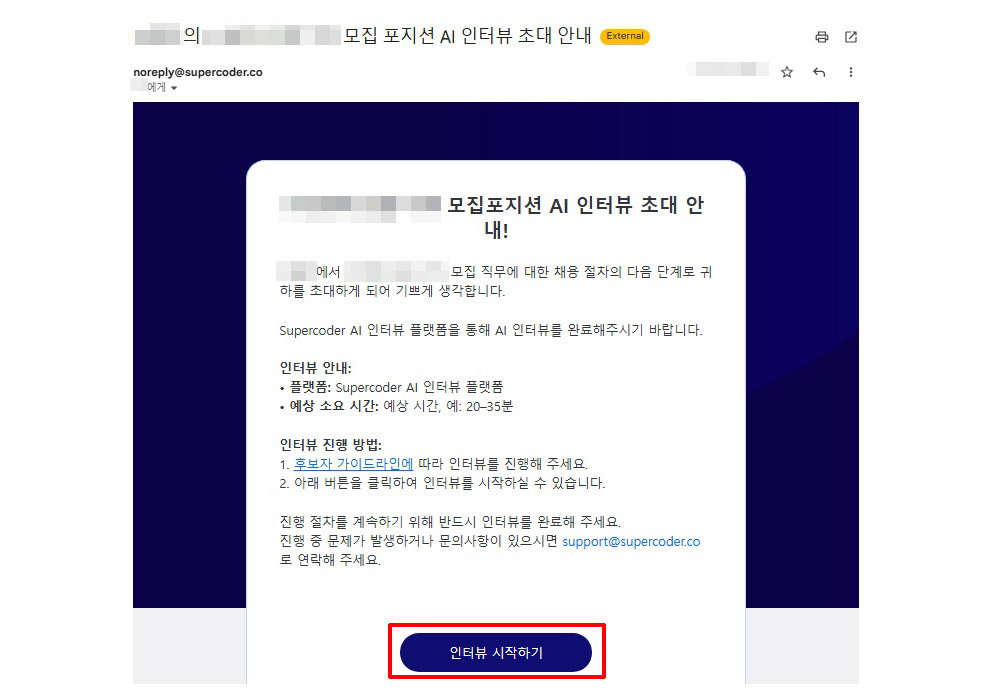
Invitation received by a candidate. To attend the interview, click “Start Interview” / Source=IT DongA
Candidates who receive an invitation can attend the interview at their preferred time and place by clicking “Start Interview” in the email.
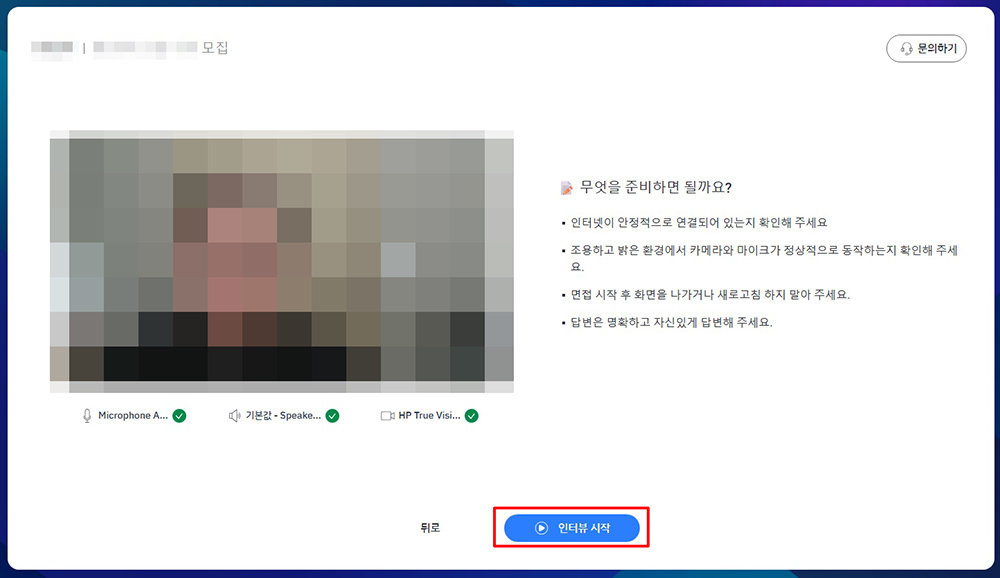
Check the camera, microphone, and speaker status, review the instructions, then click “Start Interview” / Source=IT DongA
Clicking “Start Interview” opens a new window and launches AI Interviewer. First, check the status of the camera, microphone, and speakers. As the interview scene is also recorded on video, the camera must be checked as well. After confirming the status, clicking “Next” displays instructions on how candidates should prepare for the interview. The instructions include: ▲ ensuring a stable internet connection ▲ checking that the camera and microphone work properly in a quiet and well-lit environment ▲ not exiting or refreshing the screen once the interview has started ▲ providing clear and confident answers. Once all preparations are complete, click “Start Interview” at the bottom to begin.
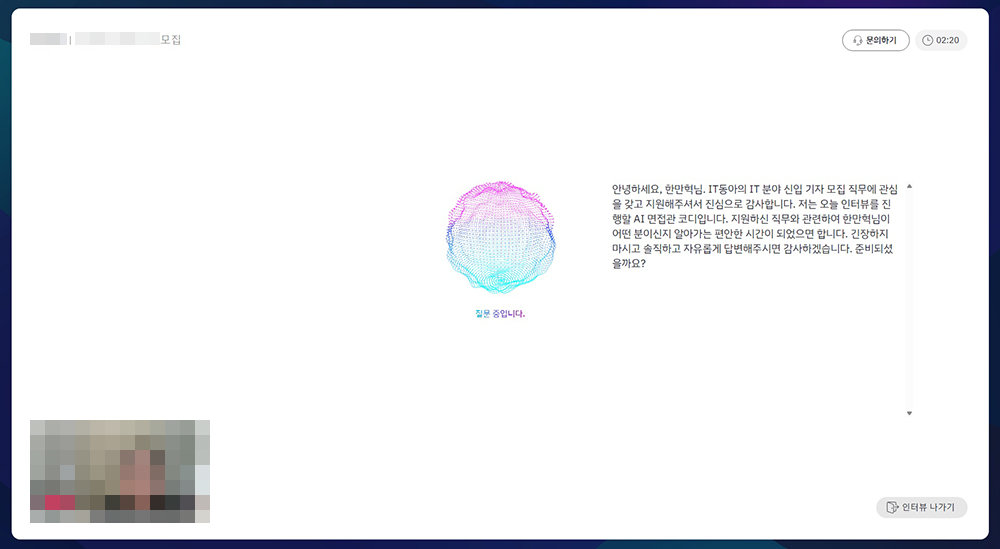
Interview screen of AI Interviewer / Source=IT DongA
When the interview begins, AI Interviewer switches to full-screen mode. The process is similar to a standard video interview. The candidate listens to the questions and responds accordingly. After finishing a response, the candidate clicks the “If you have finished your answer, please click this button” button. A follow-up or next question then appears.
The questions follow the content set by the recruiter. However, AI Interviewer does not simply read out the preset questions as written; it adapts them into natural sentences suited to the flow of conversation with the candidate. If a candidate gives an irrelevant or overly abstract answer, AI Interviewer poses follow-up questions to elicit more concrete responses. It also accommodates requests from candidates to repeat questions or wait briefly. It feels very much like talking to a real person.
Questions are displayed on the screen, but answers are not. During the interview, the browser in which AI Interviewer is running must remain active. If the user switches to another program or browser window, the interview is terminated. To exit the interview, click “Leave Interview” at the bottom right. However, once “Leave Interview” is clicked, the interview cannot be taken again, so caution is required.
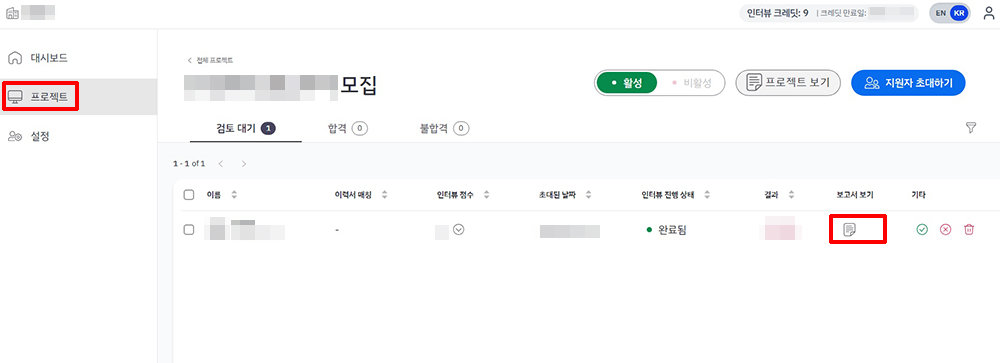
Evaluation reports can be checked via “View Report” in the Projects menu / Source=IT DongA
When the interview is over, a completion email is sent to the candidate and an evaluation report is generated. The evaluation report can be viewed by clicking “View Report” next to the candidate’s name in the Projects menu of the AI Interviewer admin page.
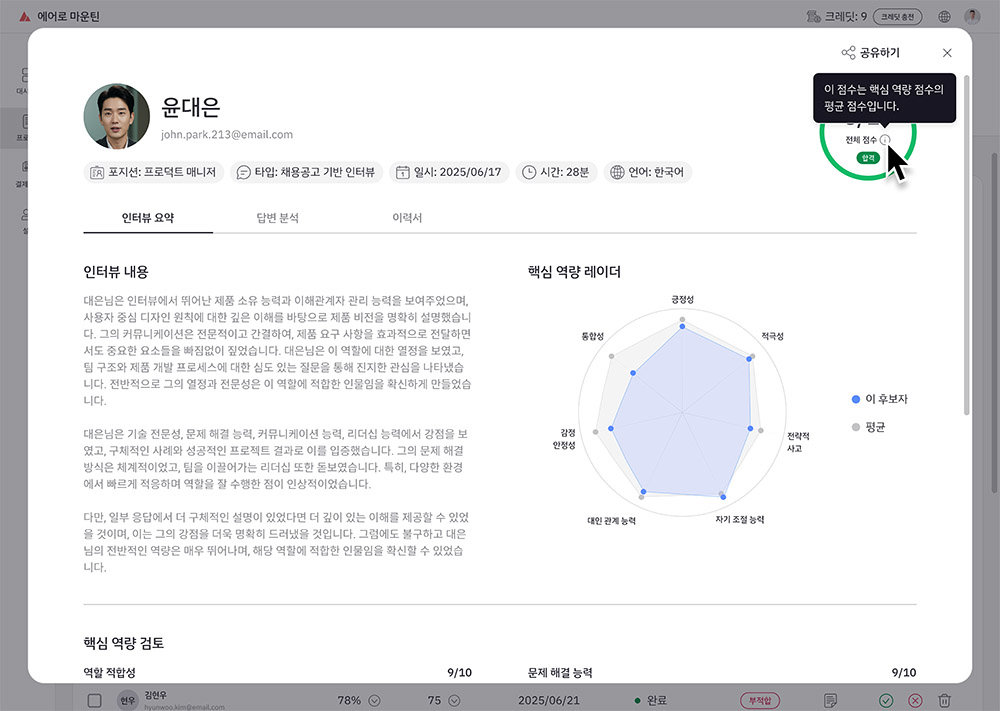
Example of an evaluation report / Source=Second Team
In the evaluation report, users can review the interview content, answer analysis, résumé, and more. It presents the results of the candidate’s competency analysis in line with the evaluation criteria using graphs and text, and also includes all questions and answers, including follow-ups. A video of the interview is also provided. The video is divided by question, making it easy to review responses to specific questions. Second Team plans to add items on candidates’ strengths and weaknesses to the evaluation report in the future.
Natural interviews and analysis of job suitability based on actual capabilitiesUsing AI Interviewer, the automatic generation of evaluation criteria and question lists, ease of use, and natural interview flow stood out.
Simply entering the job posting and description of the desired role automatically generates evaluation criteria and an interview question list, and the service analyzes job suitability based on interview content, reducing recruiters’ effort. Above all, there is no need to spend time coordinating interview schedules or invest time and resources reviewing résumés and interview content. With this tool, even companies without a dedicated recruitment process or job-specific experts should be able to hire the talent they want.
It is also highly useful from the applicant’s perspective. It is convenient to attend interviews at a preferred time and location. Questions are presented in easy-to-understand and natural language, making it feel like a conversation with a person rather than an AI. There is little noticeable difference from a typical video interview. One minor drawback is the brief pause between the end of an answer and the appearance of the next question. If the next question appeared slightly faster, the interview process would feel even more natural.
Second Team currently offers 10 AI Interviewer recruitment interviews free of charge to members registered with Supercoder. This is intended to give recruiters an opportunity to experience the service directly. Recruiters who feel burdened by hiring tasks or are preparing to recruit talent for a new role are encouraged to use the free quota to experience AI Interviewer firsthand.
IT DongA reporter Han Man-hyeok (mh@itdonga.com)
ⓒ dongA.com. All rights reserved. Reproduction, redistribution, or use for AI training prohibited.
Popular News